
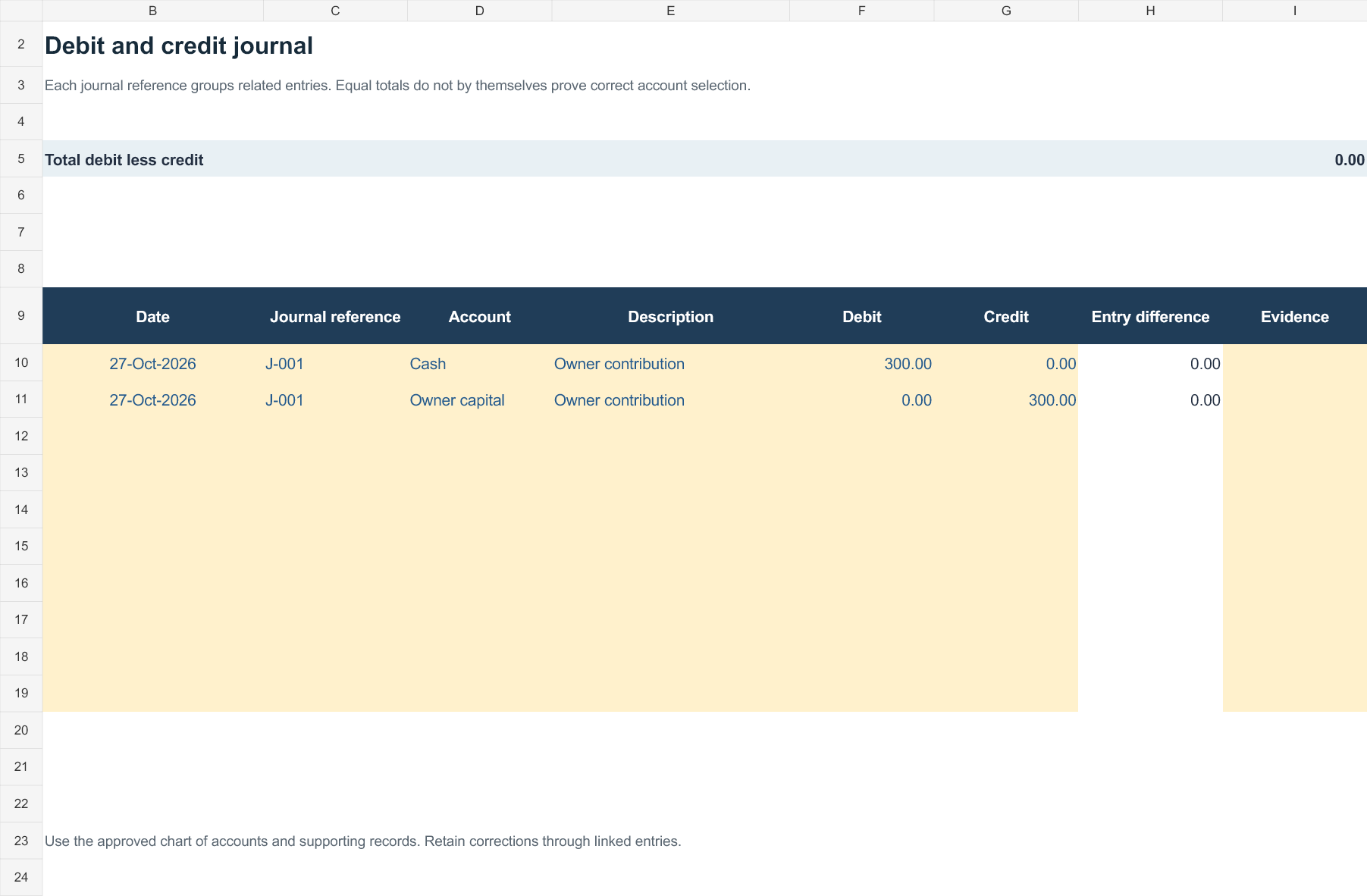
A debit-and-credit workbook must use a consistent account structure. In double-entry accounting, each transaction affects at least two accounts and total debits should equal total credits.
Editable downloads and previews
Download the editable Excel workbook
Private, non-commercial use. Download help and usage terms.
Download Debit credit journal (.xlsx)
Open in Microsoft Excel. Replace the fictional example data in the highlighted input cells; keep formula cells intact so the summaries update.
More template previews and sources
Use the file links where provided. Links labeled “View original source” open another website; check its current format, availability and terms. A preview image alone is not an editable document.
Template previews and source links
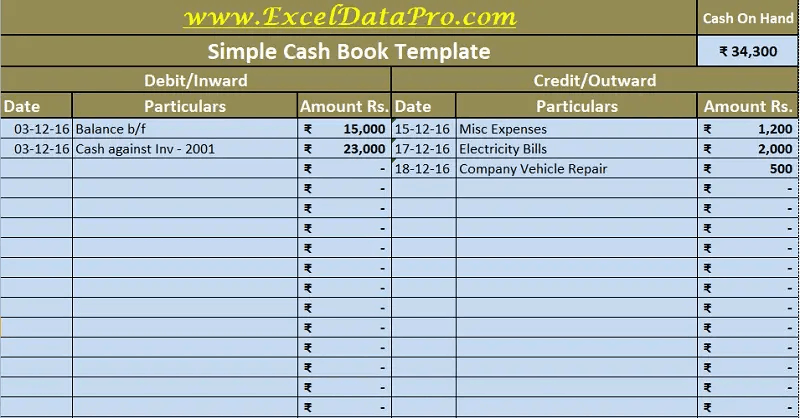 Download download.. (XLSX)
Image Examples only:
Debit Credit Transaction Sample
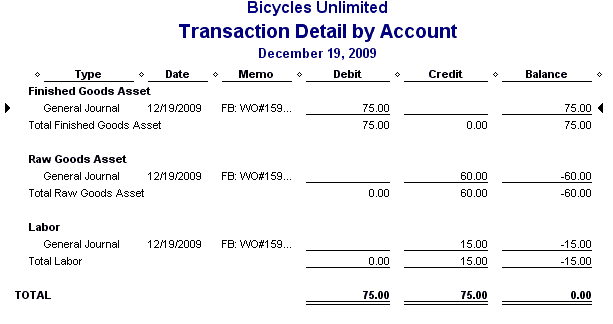
Debit Credit Entries Example
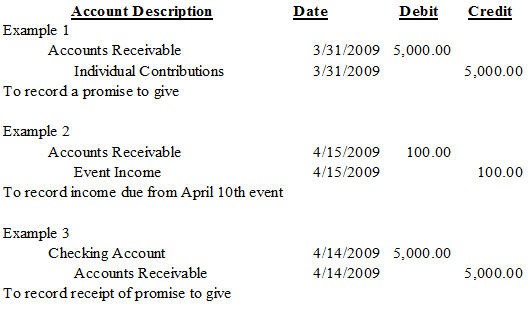
Debit Credit Guide and Information

Bonus template: Balanced debit-and-credit journal check
Use a small journal check before extending a debit-and-credit workbook. Each transaction must retain its account references as well as its balancing total.
Set up the record
- Transaction date: [date]
- Journal reference: [reference]
- Currency: [currency]
- Supporting record: [reference]
| Account | Debit | Credit | Explanation |
|---|---|---|---|
| Cash | 300.00 | — | Owner contribution received |
| Owner capital | — | 300.00 | Matching contribution entry |
| Totals | 300.00 | 300.00 | Difference: 0.00 |
How to use this template
- Identify the accounts and the actual event before choosing debit or credit columns.
- Enter the paired amounts and check the total debit less total credit.
- Review account selection and evidence even when the difference is zero; a balanced entry can still use the wrong account.
Worked example: The illustrated contribution increases cash and owner capital by the same amount. It is not recorded as sales revenue merely because cash was received.
Check before use
- Avoid using debit as a universal label for money out.
- Use the organization’s chart of accounts.
- Keep adjustments linked to the original transaction.
Use debit and credit columns for a balanced record
Worked example: A business receiving $500 cash from a customer against an existing receivable records a debit to cash and a credit to accounts receivable for $500. It does not record the receipt as another sale.
Check before use: Different account types increase on different sides, so do not describe all debits as expenses and all credits as income. Verify ledger balances before relying on a worksheet.
For related resources, see 5 Balance Sheet Formats In Excel.
What’s Included in the Debit Credit Excel Template
- Date column: Space to record the exact date each transaction occurred.
- Transaction description: A field to note the purpose or source of each debit or credit entry.
- Debit column: A dedicated column for recording money going out of the account.
- Credit column: A dedicated column for recording money coming into the account.
- Running balance: An automatically calculated balance that updates as new transactions are entered.
- Summary section: A totals area showing overall debits, credits, and the net balance for the period.
How to Start Using the Template in 3 Simple Steps
- Step 1 — Download the template: Choose the Excel format below and save it to your computer.
- Step 2 — Enter your transactions: Record each debit and credit as it occurs, including the date and a brief description.
- Step 3 — Review your running balance: Check the automatically calculated totals regularly to monitor your financial position.
Debit Credit Ledger vs. Full Accounting Software
While both approaches help track financial transactions, a debit credit Excel template and dedicated accounting software serve different needs depending on the scale of your operation. An Excel-based ledger is fast to set up, completely free, and gives you full control over the layout and formulas, making it ideal for small businesses, freelancers, or personal finance tracking. Full accounting software, by contrast, offers advanced features like automated bank feeds, invoicing, payroll integration, and multi-user access, which becomes more valuable as a business grows in size and transaction volume. Many small businesses start with a simple Excel ledger and transition to dedicated software only once their bookkeeping needs become more complex.
Understanding Debits and Credits in Basic Accounting
For those new to bookkeeping, the terms debit and credit can initially seem confusing, since their everyday meaning differs from how they function in accounting. In a general ledger, a debit typically represents money leaving an account or an increase in expenses, while a credit represents money coming into an account or an increase in income. Understanding this fundamental distinction makes it much easier to correctly categorize transactions and ensures your running balance accurately reflects your true financial position at any given time.
Using Your Ledger to Prepare Financial Statements
A well-maintained debit credit ledger isn’t just useful for day-to-day tracking, it also forms the foundation for preparing broader financial statements like income statements and balance sheets. By summarizing total debits and credits over a given period, you can quickly calculate net income, identify major expense categories, and understand overall cash flow trends. Many small business owners use their Excel ledger totals directly when preparing quarterly or annual reports, making consistent, accurate data entry throughout the year essential for reliable financial reporting.
Digital vs. Paper Ledgers
While paper ledgers were once the standard for recording debits and credits, digital spreadsheet templates offer significant advantages for modern bookkeeping. Excel-based ledgers automatically calculate running balances, eliminate arithmetic errors, and allow for instant searching and filtering of past transactions, none of which is possible with a handwritten paper ledger. Digital records are also easier to back up, share with an accountant or bookkeeper, and integrate into broader financial reporting processes, making the switch to a spreadsheet template a practical upgrade for anyone still relying on paper-based tracking.
Tracking Multiple Accounts in One Workbook
Many businesses need to track more than one account, such as a checking account, a petty cash fund, and a savings account, and a debit credit Excel template can be adapted to handle this by using separate tabs within a single workbook. Setting up one tab per account keeps each ledger clean and easy to review individually, while a summary tab can pull totals from each account to give a consolidated view of overall finances. This approach avoids the confusion of mixing transactions from different accounts in a single sheet and makes it much easier to reconcile each account against its corresponding bank statement.
Auditing Your Ledger for Accuracy
Periodically auditing your debit credit ledger helps catch errors before they compound into larger discrepancies that are harder to trace later. A simple audit involves cross-checking a sample of entries against original receipts or invoices, verifying that the running balance formula hasn’t been accidentally altered, and confirming that the total of all debits and credits matches your actual bank balance at the end of the period. Setting aside time for a monthly or quarterly review, rather than waiting until year-end, makes the process faster and significantly reduces the chance of carrying forward an uncorrected mistake.
Sharing Your Ledger With an Accountant or Bookkeeper
When it’s time to hand off your records to an accountant or bookkeeper, a clean, consistently maintained Excel ledger makes their job significantly easier and can reduce the fees you’re charged for cleanup work. Keeping consistent date formats, clear transaction descriptions, and organized supporting documentation throughout the year means your accountant can move straight into analysis and tax preparation instead of spending billable hours reconstructing missing or unclear entries. Many small business owners find that a few extra minutes spent on clear descriptions at the time of entry saves considerably more time, and money, when it comes to year-end financial reviews.
Frequently Asked Questions
Is this debit credit Excel template free to download?
Yes, the debit credit Excel template on this page is free to download and use.
Do I need advanced Excel skills to use this template?
No, basic Excel knowledge is enough since the template includes pre-built formulas for calculating running balances.
Can I use this template for personal finance tracking?
Yes, this template works well for both personal budgeting and small business bookkeeping.
Can I add more columns to categorize my transactions?
Yes, the template is fully editable, so you can add columns for categories, notes, or additional details.
Will this template automatically calculate my balance?
Yes, the template includes built-in formulas that update your running balance as you enter new transactions.
Can I track multiple accounts using this template?
Yes, you can use separate tabs within the same workbook to track different accounts individually.
Is this template suitable for tax preparation?
Yes, well-organized debit and credit records make it much easier to gather figures needed for tax filing.

You must be logged in to post a comment.