
Keeping track of where your money is invested, how each holding is performing, and what your overall portfolio looks like becomes far easier with a dedicated investment template excel sheet instead of scattered notes or memory. Whether you’re an individual investor managing a personal portfolio or a business tracking company investments, a structured spreadsheet lets you record every investment’s details, monitor returns, and make informed decisions about where to put your money next. Below you can download free, editable investment templates built entirely in Microsoft Excel, ready to customize for your own investment tracking needs.
What Is an Investment Template Excel?
An investment template excel is a spreadsheet designed to record and track the details of your investments, including the amount invested, the current value, and the return generated over time. Many versions can automatically calculate metrics such as return on investment or standard deviation, saving you from manual calculations. Because it’s built in Excel, the template is fully editable, letting you add new investments, adjust categories, or extend the tracking period as your portfolio grows.
Why You Need an Investment Template: Key Benefits
- Centralizes your portfolio: All your investments are recorded in one place instead of scattered across statements and accounts.
- Tracks performance automatically: Built-in formulas calculate return on investment and other key metrics as you update values.
- Supports better decisions: Seeing all your holdings side by side makes it easier to spot underperforming investments or rebalancing opportunities.
- Simplifies reporting: A clean, organized template makes it easy to share your portfolio summary with a financial advisor or business partner.
- Saves money on software: A well-built spreadsheet delivers much of the tracking value of paid portfolio management tools at no cost.
- Works for personal or business use: The same structure applies whether you’re tracking personal investments or a company’s investment portfolio.
What’s Included in the Investment Template
- Investment name and type: The specific asset, fund, or instrument being tracked.
- Amount invested: The original capital put into each investment.
- Current value: The present worth of the investment, updated as values change.
- Return calculation: A formula-driven field showing gain or loss, often as a percentage.
- Date and notes: When the investment was made and any relevant context for future reference.
Who Should Use This Template?
- Individual investors tracking a personal portfolio of stocks, funds, or other assets.
- Small business owners monitoring company investments alongside core operations.
- Financial advisors who want a simple, shareable format for client portfolio summaries.
- Anyone new to investing who wants a straightforward way to start tracking performance.
How to Start Using the Template in 3 Simple Steps
- Step 1 — Download a template: Choose either version below and save it to your computer.
- Step 2 — Enter your investment details: Add the name, amount invested, and current value for each holding.
- Step 3 — Review your returns: Use the calculated fields to track performance and update the sheet as values change.
Investment Template vs. Manual Tracking
Many investors try to keep track of their portfolio through separate account statements or by memory, which becomes unmanageable as holdings grow. An investment template solves this by bringing every investment into one consistent view, with formulas that calculate returns automatically instead of requiring manual math each time you check performance. It also creates a historical record you can look back on to understand how your portfolio strategy has evolved over time.
Customizing the Template for Your Portfolio
These templates are a flexible starting point. You might add a column for asset category, risk level, or dividend income, or build a simple chart to visualize your portfolio allocation. Because the templates are built in standard Excel, these adjustments take only a few minutes and don’t require advanced spreadsheet knowledge.
Common Mistakes to Avoid
- Not updating current values regularly: An outdated sheet gives a misleading picture of your actual returns.
- Ignoring fees and costs: Transaction fees and management costs affect your real return and should be tracked alongside the investment value.
- Mixing personal and business investments: Keeping these separate makes reporting and tax preparation much easier.
- Focusing on a single metric: Return percentage alone doesn’t tell the whole story; consider risk and time horizon too.
- Not backing up the file: A lost spreadsheet means losing your investment tracking history.
Tips to Get the Most Out of Your Investment Template
- Update values on a consistent schedule, such as monthly or quarterly, for accurate trend tracking.
- Review your allocation periodically to ensure your portfolio still matches your goals.
- Use the notes column to record the reasoning behind each investment decision.
- Back up your file using cloud storage so your tracking history is never lost.
- Compare returns across investments to identify which holdings are performing best over time.
See Our Investment Templates Excel Below
Editable Investment Template Excel
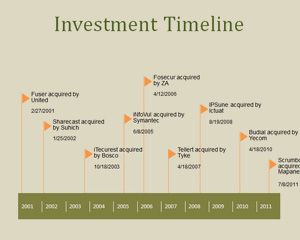

Printable Investment Template Sample
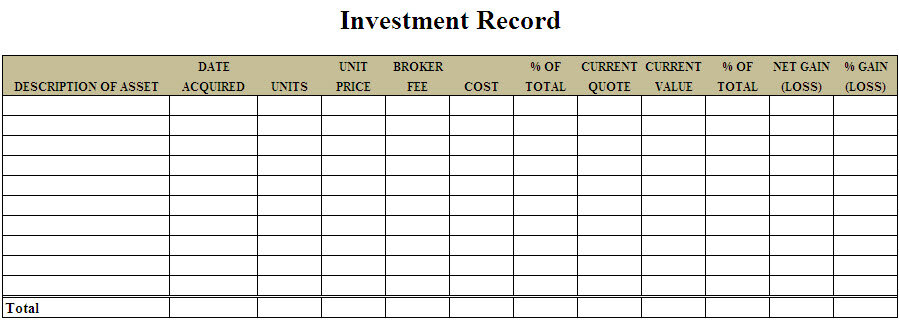
Frequently Asked Questions
Is this investment template excel free to download?
Yes, both investment templates on this page are free to download and use for personal or business investment tracking.
Can I edit the template after downloading it?
Yes, the templates are fully editable, so you can adjust columns, add investment categories, and change formulas as needed.
Does the template calculate returns automatically?
Yes, the templates include formulas that can calculate return on investment and related metrics once you enter your figures.
Can I track multiple types of investments in one sheet?
Yes, you can track stocks, funds, real estate, or other asset types together, or separate them by adding category columns.
Do I need Microsoft Excel to use this template?
The templates are built for Excel but will also open in free alternatives such as Google Sheets or LibreOffice Calc.
How often should I update my investment tracker?
Updating monthly or quarterly is typical, though you can update as often as your investment strategy requires.
Is this suitable for tracking business investments as well as personal ones?
Yes, the same structure works for both personal and business investment portfolios.

You must be logged in to post a comment.