
A requisition form is an internal request for goods or services, not an invoice or purchase order. It should identify the requester, department, item specification, quantity, needed-by date and approver.
Link internal requisitions to a clear approval chain
Worked example: A maintenance team requesting eight replacement filters can record the compatible model, estimated unit price, budget code and required delivery date before procurement requests supplier quotations.
Check before use: Define approval thresholds and avoid buying from an unapproved request. Number requests uniquely and keep the final approved order or delivery record connected to the form.
- Saves preparation time: A ready-made layout means you can focus on processing requests instead of designing a form from scratch.
- Keeps records organized: Clearly labeled fields for item details and quantities reduce confusion during the ordering process.
- Improves accountability: A structured request record helps track who requested what and when.
- Supports better budgeting: Consistent requisition records make it easier to track departmental spending on supplies.
- Works for various purposes: Templates are suitable for purchase requests, material requests, and inventory replenishment alike.
- Free and reusable: Download once and reuse the same template structure for every future requisition.
For related resources, see 11+ Free Vendor List Templates and 24+ Printable Proposal Form Templates.
What’s Included in the Requisition Form Template
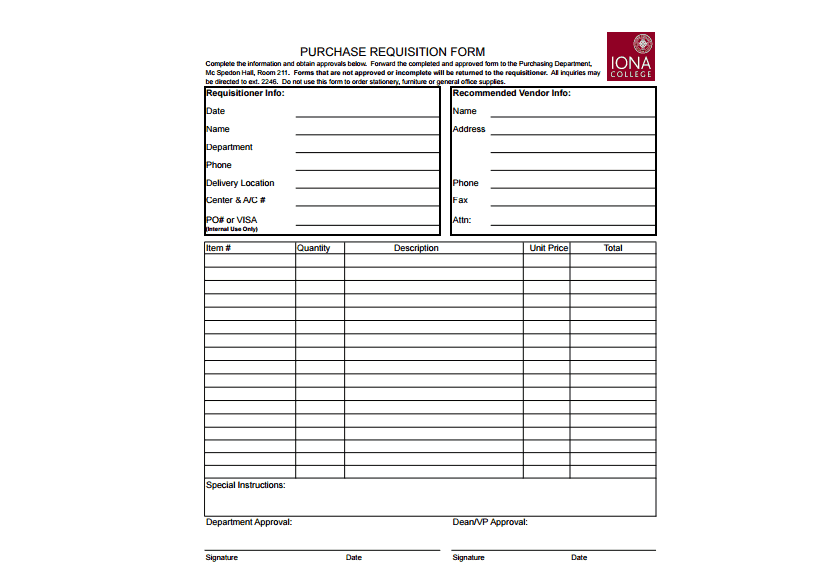
- Requester information: Space to list the name and department of the person submitting the request.
- Item description: A section describing the specific items, materials, or supplies being requested.
- Quantity needed: Fields for the number of units or amount of each item required.
- Date needed: Space to note when the requested items are needed by.
- Approval signature: A line for a supervisor or manager to approve the request before it’s processed.
- Cost or budget code: Some templates include a field for tracking cost center or budget allocation.
Who Should Use These Templates?
- Office managers processing requests for supplies and equipment from staff.
- Warehouse and inventory staff tracking material requests from different departments.
- Department heads submitting formal requests for budget-approved purchases.
- Procurement teams reviewing and processing incoming requisition requests.
- Small business owners keeping a simple, organized record of internal supply requests.
- Employees needing a formal way to request materials or equipment for their work.
How to Start Using the Template in 3 Simple Steps
- Step 1 — Choose a template style: Browse the 2 options below and select the format that best fits your process.
- Step 2 — Fill in the request details: Enter the item description, quantity, and requester information.
- Step 3 — Route for approval: Send the completed form to a supervisor or purchasing team for approval and processing.
Requisition Forms vs. Purchase Orders
While both documents relate to acquiring goods, a requisition form and a purchase order serve different purposes in the procurement process. A requisition form is an internal document used to request that something be purchased, typically requiring approval before any order is placed. A purchase order, by contrast, is an external document sent to a vendor or supplier that formally commits the business to purchasing specific items at agreed prices. Understanding this distinction helps ensure that internal requests are properly approved before external purchase orders are created and sent to suppliers.
Customizing the Template for Your Business
These templates are designed to be a flexible starting point rather than a fixed format. You can add your company’s logo for a more official appearance, adjust the fields to match your specific approval workflow, or add extra columns for information relevant to your industry. Since the templates are provided in editable Word and Excel formats, most adjustments take only a few minutes and let you tailor the requisition form to fit your specific business processes.
Choosing the Right Format
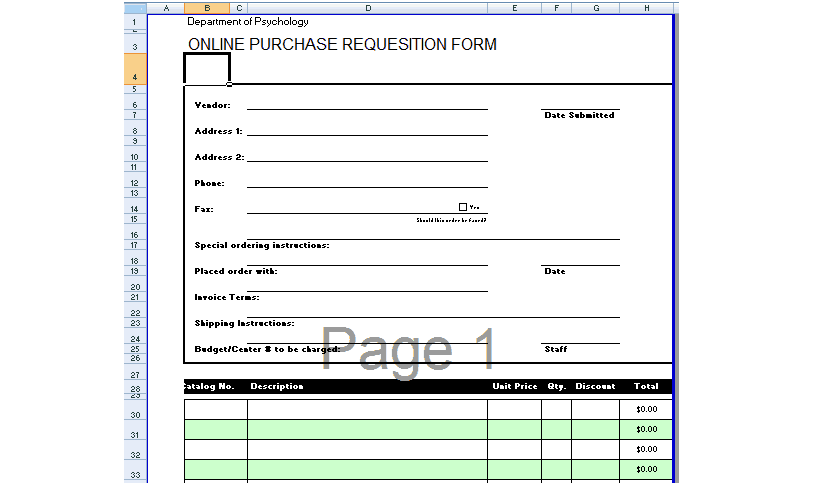
With 2 different templates available, choosing the right one depends on how your business tracks and processes requests. The Word-based template works well for simple, printable requisition forms that get filled out by hand or digitally and routed for signature. The Excel-based template is better suited for businesses that want to track multiple requisitions in a running log or need to calculate totals and costs automatically.
Common Mistakes to Avoid
- Missing item descriptions: Always include enough detail so the purchasing team understands exactly what’s needed.
- Skipping the approval step: Always route the form through the proper approval process before ordering.
- Forgetting quantities: Clearly specify how many units of each item are being requested.
- Inconsistent formatting: Keep requisition forms consistent across departments to simplify processing.
- Not tracking submitted requests: Keep a log of submitted requisitions to avoid duplicate orders.
Tips to Get the Most Out of Your Requisition Form Template
- Set a standard submission deadline so requests can be batched and processed efficiently.
- Keep a digital archive of completed requisition forms for record-keeping and budget tracking.
- Train staff on proper use of the form to reduce errors and incomplete submissions.
- Review requisition patterns periodically to identify opportunities for bulk purchasing discounts.
- Use consistent item naming across requests to make inventory tracking easier.
Using Requisition Forms for Inventory Management
Requisition forms play an important role in inventory management by creating a documented trail of what materials are being used and by which departments, which helps businesses maintain accurate stock levels. When requisitions are tracked consistently over time, inventory managers can identify usage patterns and adjust reorder points accordingly, reducing the risk of running out of critical supplies. This documented history also makes it easier to spot unusual spikes in requests, which can sometimes indicate waste, misuse, or a need to review current stock allocation practices.
Streamlining the Approval Workflow
A clear, well-organized requisition form can significantly speed up the approval process, especially in businesses where multiple layers of sign-off are required before a purchase can be made. Including all necessary fields upfront, such as budget codes and cost estimates, reduces the back-and-forth that often happens when a form is submitted incomplete. Some organizations also find it helpful to set clear approval thresholds, so smaller requests can be approved quickly by a direct supervisor while larger purchases require additional review.
Tracking Requisition Costs Against Department Budgets
For businesses that allocate specific budgets to different departments, tracking requisition costs against those budgets is an important part of financial oversight. Including a cost or budget code field on the requisition form makes it easier for finance teams to reconcile spending at the end of each reporting period. Reviewing requisition costs regularly also helps department heads stay aware of their remaining budget and make more informed decisions about which requests are truly necessary before the next reporting cycle closes.
Moving from Paper to Digital Requisition Processes
While many businesses still rely on printed requisition forms routed for physical signatures, an increasing number are transitioning to digital versions that can be filled out, approved, and archived electronically. Digital requisition processes can speed up approval times significantly, since forms no longer need to be physically carried between offices or departments for sign-off. Even a simple Excel-based template shared through a company drive can serve as a stepping stone toward a more streamlined, paperless requisition workflow before investing in dedicated procurement software.
Handling Urgent or Emergency Requisitions
Not every request can wait for the standard approval cycle, so it helps to have a clear process in place for urgent or emergency requisitions when equipment fails or supplies run out unexpectedly. Marking a requisition form as urgent and routing it directly to a supervisor for expedited approval can prevent delays that might otherwise disrupt daily operations. Businesses that handle emergency requests frequently often benefit from setting aside a small discretionary budget specifically for these situations, so approvals don’t get held up by standard budget review procedures.
Training New Employees on the Requisition Process
New employees often aren’t familiar with a company’s specific requisition procedures, so including a brief walkthrough of the process during onboarding can prevent confusion and improperly submitted forms down the line. Providing a filled-out example alongside the blank requisition form template gives new staff a clear reference for how much detail to include and where to route the completed form. Taking the time to explain the approval hierarchy and expected turnaround times upfront also helps set realistic expectations for how quickly requested items will actually arrive.
Auditing Requisition Records for Compliance
Businesses in regulated industries or those with strict internal controls often need to periodically audit their requisition records to confirm that purchases followed proper approval procedures. Keeping requisition forms organized by date and department makes it much easier to pull records quickly when an internal or external audit is requested. A consistent requisition process also creates a clear paper trail that can help resolve disputes over missing items, incorrect orders, or questions about who authorized a particular purchase.
Download requisition form templates here
Purchase Requisition Form Word Template

Excel Online Purchase Requisition Form
Frequently Asked Questions
Are these requisition form templates free to download?
Yes, both requisition form templates on this page are free to download and use.
Which file formats are these templates available in?
The templates are available in editable Word and Excel formats.
Can I use these templates for purchase requests?
Yes, one template is specifically designed as a purchase requisition form.
Are these templates suitable for small businesses?
Yes, these templates work well for small businesses as well as larger organizations with multiple departments.
Can I customize the fields on these templates?
Yes, since the templates are fully editable, you can adjust fields and layout to fit your specific process.
Do these templates include an approval section?
Yes, both templates include space for a supervisor or manager to approve the request.
Can I use the Excel template to track multiple requisitions?
Yes, the Excel-based template is well suited for logging and tracking multiple requisition requests over time.

You must be logged in to post a comment.