
Keeping track of every customer’s contact details, purchase history, and communication notes becomes far easier with a client database template already structured and ready to use. Instead of building a tracking system from scratch, a ready-made Excel template gives you a clean, organized framework you can fill in with client details in minutes. Below you’ll find 3 free, downloadable client database templates in Excel, suitable for small businesses, freelancers, and growing companies alike.
What Is a Client Database Template?
A client database template is a pre-formatted Excel spreadsheet used to organize and store information about a business’s customers or clients in one central location. Rather than designing a tracking system from scratch, a ready-made template gives you a structured framework already built to capture names, contact information, purchase history, and communication notes. These templates are used by small business owners, sales teams, and freelancers who need a clear, organized way to manage customer relationships and keep every interaction on record.
Why You Need a Client Database Template: Key Benefits
- Saves setup time: A ready-made layout means you can start entering client information right away instead of designing a spreadsheet from scratch.
- Keeps records organized: Clearly labeled fields for contact details and history reduce confusion when looking up a client’s information.
- Improves communication: Having all client details in one place makes it easier to stay in touch and follow up at the right time.
- Supports better marketing: A well-organized client database makes it simple to reach out about new products or promotions.
- Reduces paperwork: Digital records eliminate the clutter of physical files and make information easy to search and update.
- Free and reusable: Download once and reuse the same template structure as your client list grows.
What’s Included in the Client Database Template
- Client name and company: Space to record the name of each client and, where relevant, their company or organization.
- Contact information: Fields for phone number, email address, and mailing address.
- Account or reference number: An optional field for internal tracking of each client account.
- Purchase or service history: Space to log what products or services the client has purchased or used.
- Communication notes: A field for recording important details from past conversations or interactions.
- Follow-up date: Some templates include a field to track when the next contact or check-in is due.
Who Should Use These Templates?
- Small business owners managing a growing list of customers and clients.
- Freelancers and consultants tracking client details and project history.
- Sales teams organizing leads and existing customer relationships.
- Service-based businesses tracking appointments and client preferences.
- Marketing professionals planning outreach based on client history.
- Customer support teams keeping a record of past client interactions.
How to Start Using the Template in 3 Simple Steps
- Step 1 — Choose a template style: Browse the 3 options below and select the format that best fits your needs.
- Step 2 — Enter your client details: Fill in contact information, purchase history, and any relevant notes for each client.
- Step 3 — Keep it updated: Add new clients and update existing records regularly to keep the database accurate.
Client Database vs. CRM Software
While both tools help manage customer relationships, a client database template and CRM software serve different needs. A CRM (customer relationship management) system is a dedicated software platform with automated features like reminders, email integration, and sales pipeline tracking. A client database template, by contrast, is a simpler spreadsheet-based solution that’s easier to set up and doesn’t require a subscription or software installation. Many small businesses start with a template and later transition to a full CRM system as their client list and needs grow.
Customizing the Template for Your Business
These templates are designed to be a flexible starting point rather than a fixed format. You can add extra columns for industry-specific details, adjust the layout to match your sales process, or include additional fields for referral sources or client preferences. Since the templates are provided in editable Excel format, most adjustments take only a few minutes and let you tailor the database to fit your specific business needs.
Choosing the Right Format
With 3 different templates available, choosing the right one depends on how much detail you want to track for each client. Simpler templates work well for businesses that just need basic contact information, while more detailed templates with additional fields are better suited for businesses that track extensive purchase or communication history. Reviewing each option before committing can help you find the layout that best matches your workflow.
Common Mistakes to Avoid
- Leaving fields incomplete: Always fill in contact information fully so you can reach clients when needed.
- Not updating regularly: Outdated client information can lead to missed opportunities and communication issues.
- Skipping communication notes: Recording details from past interactions helps maintain consistency in future conversations.
- Using inconsistent formatting: Keep naming and formatting consistent across entries to make sorting and searching easier.
- Not backing up the file: Regularly save a backup copy of your client database to avoid losing important information.
Tips to Get the Most Out of Your Client Database Template
- Update the database immediately after each new client interaction to keep records accurate.
- Sort and filter regularly to identify clients who may need a follow-up.
- Keep a consistent naming convention for files and records to make information easy to find.
- Review your client list periodically to spot trends in purchases or engagement.
- Protect sensitive information by storing the file securely and limiting access to authorized team members.
Using a Client Database for Better Customer Retention
A well-maintained client database does more than store contact information, it can play a direct role in keeping customers coming back. Reviewing purchase history and communication notes before reaching out allows businesses to personalize their outreach, which often leads to stronger client relationships and repeat business. Tracking how long it’s been since a client’s last purchase or interaction can also help identify who might benefit from a check-in or special offer.
Segmenting Clients for Targeted Marketing
Beyond basic contact management, a client database can be a valuable tool for organizing customers into groups based on shared characteristics, such as purchase frequency, industry, or location. This kind of segmentation makes it easier to tailor marketing messages to the right audience rather than sending the same generic message to every client. Businesses that regularly review and update their client segments tend to see better engagement from targeted outreach compared to a one-size-fits-all approach.
Managing Client Data Across a Growing Team
As a business grows and more team members interact with clients, keeping a shared, up-to-date client database becomes increasingly important for avoiding duplicated efforts or missed follow-ups. Establishing a clear process for who updates the database and when helps ensure that every team member is working from the same accurate information. Storing the file in a shared, access-controlled location also helps prevent multiple versions of the database from circulating and causing confusion.
Protecting Client Data and Maintaining Privacy
Because a client database contains personal and potentially sensitive information, it’s important to handle it with appropriate care regarding storage and access. Limiting who can view or edit the file, using password protection where appropriate, and avoiding sharing the database through unsecured channels all help protect client privacy. Businesses that handle a larger volume of client data may also want to review relevant data protection regulations that apply to their industry or location.
Transitioning From a Spreadsheet to Dedicated Software
While a client database template works well for many small businesses, there may come a point where the number of clients or the complexity of tracking needs outgrows what a spreadsheet can handle efficiently. Signs that it may be time to transition include difficulty searching large amounts of data, multiple team members needing simultaneous access, or a need for automated reminders and reporting. Starting with a template, however, gives businesses a clear understanding of what fields and information matter most, which makes choosing and setting up dedicated CRM software much easier down the line.
Using a Client Database for Sales Forecasting
A detailed client database can also support sales forecasting by giving a clear view of purchase patterns and client value over time. Reviewing how often certain clients make purchases, and the typical size of those purchases, can help a business project future revenue more accurately than relying on guesswork. Sales teams that regularly analyze their client database alongside their sales targets are often better equipped to identify which clients are worth prioritizing for upselling or renewal conversations.
Integrating a Client Database With Other Business Records
A client database rarely exists in isolation, and many businesses find value in aligning it with other records such as invoicing history, project files, or support tickets. Keeping consistent client identifiers, such as a shared account or reference number, across these different records makes it much easier to cross-reference information when a question or issue arises. Businesses that maintain this kind of consistency often find it easier to onboard new employees, since all of a client’s history can be pulled together quickly from a single reference point.
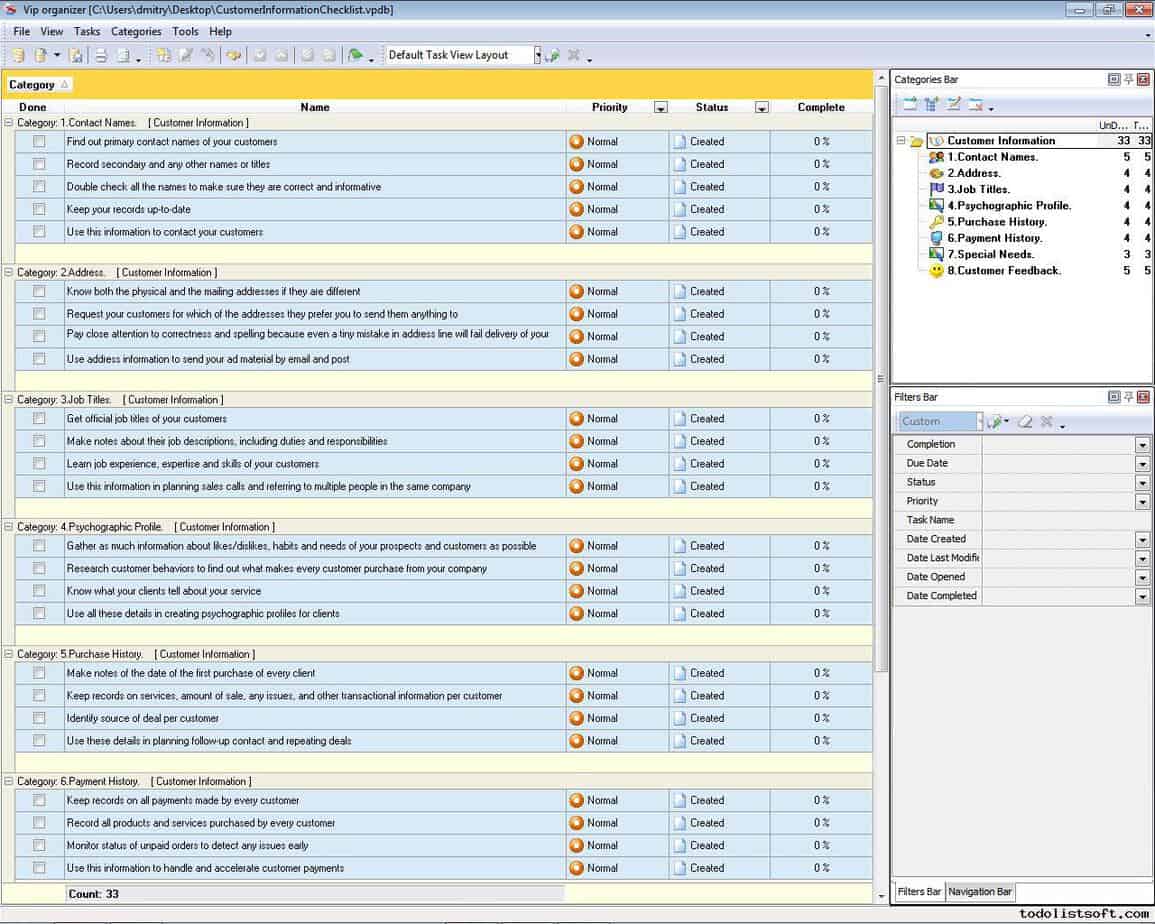
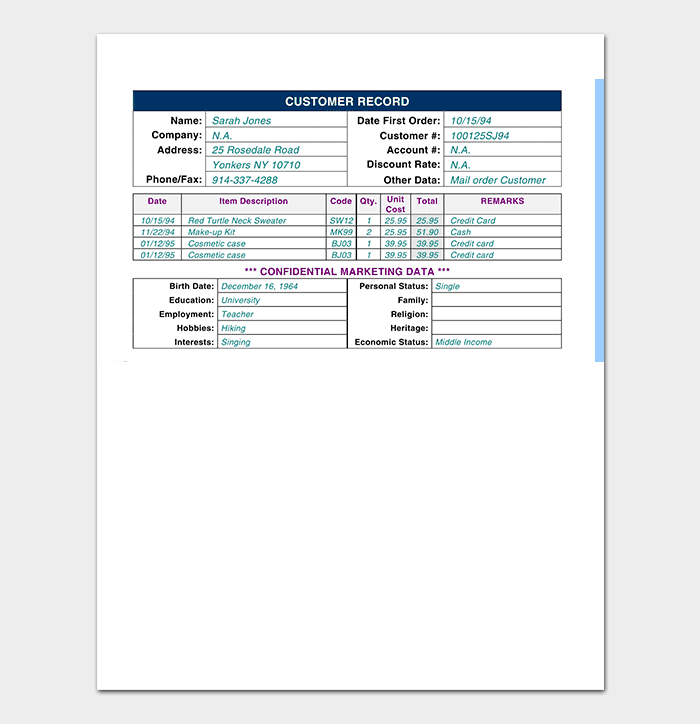
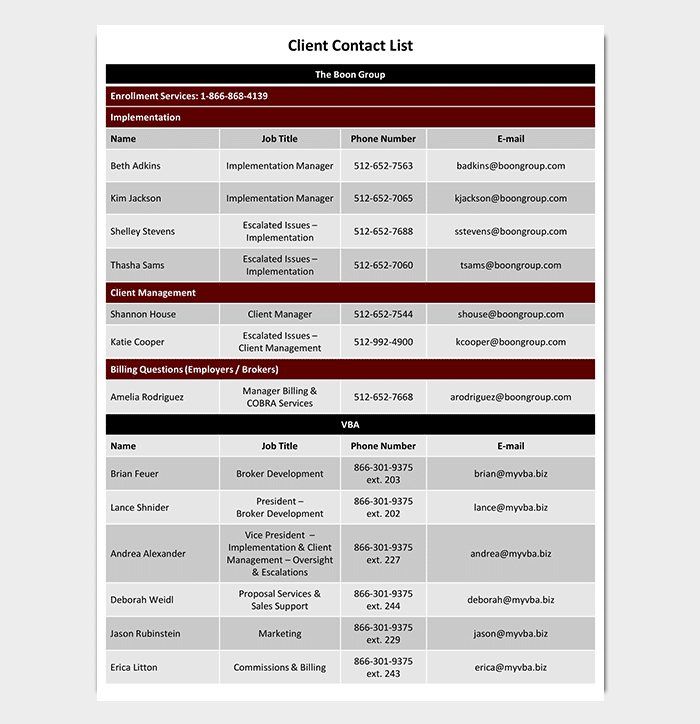
Excel Client Database Templates Are Here
Sample Excel Client Database Template

Frequently Asked Questions
Are these client database templates free to download?
Yes, all 3 client database templates on this page are free to download and use.
Which file format are these templates available in?
These templates are available in Microsoft Excel format.
Can I customize the fields on these templates?
Yes, since the templates are fully editable, you can add or adjust fields to match your specific business needs.
Is a client database the same as a CRM system?
No, a CRM system is dedicated software with automated features, while a client database template is a simpler spreadsheet-based solution.
Are these templates suitable for freelancers?
Yes, freelancers and consultants can use these templates to track client details and project history just as easily as larger businesses.
Can these templates help with marketing outreach?
Yes, having organized client information makes it easier to segment clients and plan targeted marketing campaigns.
How often should I update my client database?
It’s best to update your client database immediately after each new client interaction to keep records accurate and useful.

You must be logged in to post a comment.