
A ledger should use an account name, date, transaction reference, description, debit, credit and running balance. The meaning of each entry depends on the account type and the accounting method being used.
Use an Excel ledger to maintain a traceable balance
Worked example: For a cash account beginning at $500, receiving $300 and paying $125, the cash balance becomes $675. The related counterpart entries belong in other accounts under double-entry bookkeeping.
Check before use: Reconcile against supporting invoices or bank records and check formula ranges after inserting rows. A basic single-sheet register is not automatically a complete general ledger.
For related resources, see 2 Free Ledger Statement Formats Excel and 4+ Debit Credit In Excel Templates.
What’s Included in the Excel Ledger Template
Each template includes columns for the transaction date, a description of the transaction, and separate fields for debit and credit amounts. There’s a running balance column that updates automatically as new entries are added, plus space to categorize transactions by account type or code. Most templates also include built-in formulas that calculate totals and balances, reducing the need for manual math and lowering the risk of errors.
Who Should Use These Templates?
Small business owners use these templates to track income and expenses without investing in dedicated accounting software. Bookkeepers and accountants rely on them to maintain accurate client records or to supplement more complex accounting systems. Freelancers and independent contractors use excel ledgers to keep a simple record of their business transactions for tax purposes, and nonprofit organizations use similar templates to track donations and expenditures. Anyone responsible for maintaining accurate financial records can benefit from these templates.
How to Start Using the Template in 3 Simple Steps
Step 1 is to browse the 3 options below and choose the layout that best fits your accounting needs. Step 2 is to customize the column headings and categories to match your specific accounts and transaction types. Step 3 is to begin entering transactions as they occur, letting the built-in formulas calculate your running balance automatically.
Excel Ledger Templates vs. Accounting Software
While both aim to track financial transactions, an excel ledger template and dedicated accounting software serve different scales of operation. A template is free to use and requires no setup, making it ideal for small businesses or individuals with straightforward bookkeeping needs. Accounting software, on the other hand, typically offers automated bank feeds, invoicing, and tax reporting features, but comes with a subscription cost and a steeper learning curve. Many small businesses start with a simple excel ledger and consider upgrading to dedicated software only once their transaction volume grows significantly.
Customizing the Template for Your Business
These templates are designed to be a flexible starting point rather than a fixed format. You can add or remove columns to match your specific accounting needs, adjust the categories to reflect your chart of accounts, or add your company name and branding for a more professional look. Customization depends on the file supplied by the source. Check its format and editability before making changes.
Choosing the Right Format
With 3 different templates available, choosing the right one depends on the complexity of your bookkeeping needs and how many accounts you need to track. A simpler layout works well for tracking a single account or a small number of transactions, while a more detailed template suits businesses that need to track multiple accounts or categories simultaneously. Reviewing each option before committing to one can help you find the format that best fits your record-keeping needs.
Common Mistakes to Avoid
Failing to record transactions promptly is one of the most common causes of inaccurate ledgers, so it’s worth building a habit of entering data as soon as possible after each transaction occurs. Overwriting or deleting built-in formulas by accident can break automatic calculations, so it’s important to be careful when editing cells near formula-driven columns. Not backing up the ledger regularly can lead to lost records if a file becomes corrupted, and inconsistent categorization of transactions can make it harder to generate accurate financial reports later.
Tips to Get the Most Out of Your Excel Ledger Template
Enter transactions consistently and promptly to keep your ledger accurate and up to date. Back up your spreadsheet regularly, either through cloud storage or a separate saved copy, to protect against accidental data loss. Double-check that formulas remain intact after adding new rows or columns, and consider color-coding different transaction categories to make the ledger easier to scan visually. Reviewing your ledger periodically, such as monthly, can also help you catch errors early and stay on top of your financial position.
Reconciling Your Ledger with Bank Statements
Regularly comparing your excel ledger against your bank or credit card statements is an important habit that helps catch errors, missed transactions, or unauthorized charges before they become bigger problems. Setting aside time each month to reconcile your records, checking that every transaction in your ledger matches an entry on your statement and vice versa, gives you confidence that your financial records accurately reflect reality. When a discrepancy does turn up, tracking it down promptly while the details are still fresh is much easier than trying to investigate a mismatch months later.
Preparing Your Ledger for Tax Season
A well-maintained excel ledger can significantly simplify the tax preparation process by providing a clear, organized record of income and expenses throughout the year. Categorizing transactions consistently as they’re entered, rather than trying to sort them all at once before a filing deadline, saves considerable time and reduces the risk of miscategorized expenses. Keeping supporting documentation, such as receipts and invoices, referenced or attached alongside their corresponding ledger entries also makes it much easier to substantiate deductions if your records are ever reviewed.
Transitioning from a Manual Ledger to Digital Records
For businesses moving away from a paper-based ledger system, transferring historical records into an excel template can feel like a significant undertaking, but breaking the process into manageable chunks makes it far more approachable. Starting with the most recent transactions and working backward, rather than attempting to digitize years of records all at once, allows you to begin benefiting from automated calculations right away while gradually filling in historical data. Double-checking a sample of transferred entries against the original paper records helps catch transcription errors before they compound into larger discrepancies down the line.
Protecting Your Ledger File from Errors and Loss
Since an excel ledger often becomes the single source of truth for a business’s financial history, taking a few precautions to protect the file is well worth the small amount of extra effort involved. Saving a backup copy on a separate drive or in cloud storage protects against the file becoming corrupted or accidentally deleted, while password-protecting the file adds a layer of security for sensitive financial data. Locking cells that contain formulas, a feature built into Excel, can also prevent accidental edits from disrupting your automatic calculations, which is especially useful if more than one person has access to the file.
Download Excel Ledger Templates Free
Excel Customer Ledger Template
ZIP and RAR links are archives: check the files inside after extraction. PDF and image links are examples rather than editable Word or Excel files. External resources follow their source’s availability and usage terms. Read download help.
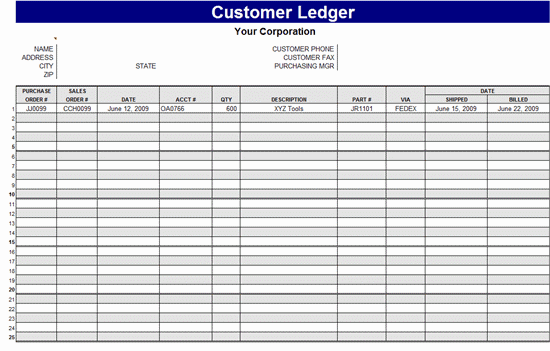
Open Excel Customer Ledger Template source (Excel XLTX)
General Ledger Template in Excel

Open General Ledger Template in Excel source (Excel XLS)
MS Excel Ledger Template Sample
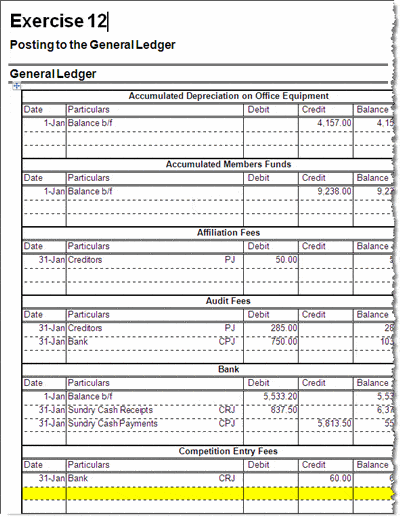
Open MS Excel Ledger Template Sample source (Word DOC)
Frequently Asked Questions
Are these excel ledger templates free to download?
Check the labelled resource links for availability and review the source’s terms before downloading or reusing a file.
Can I customize the columns and categories in these templates?
Yes, the templates are editable in Excel so you can add, remove, or rename columns and categories to fit your needs.
Do these templates include automatic calculations?
Yes, most templates include built-in formulas that calculate running balances and totals automatically.
What’s the difference between a ledger and a journal?
A journal records transactions in the order they occur, while a ledger organizes those entries into individual accounts.
Can I use these templates for personal finances instead of a business?
Yes, these templates can be adapted for personal budgeting and expense tracking as well as business use.
How often should I update my excel ledger?
It’s best to enter transactions as soon as possible after they occur to keep your records accurate and current.
Is an excel ledger a good substitute for accounting software?
For small businesses with straightforward bookkeeping needs, an excel ledger can work well, though larger businesses may eventually need dedicated software.

You must be logged in to post a comment.