
An Excel ledger statement should identify the account, period, opening balance and each debit or credit with a date and reference. A closing balance is useful only if transactions are recorded in a consistent order.
Keep ledger statements traceable to source transactions
Worked example: If an opening receivable is $1,000, a new invoice adds $200 and a customer payment reduces it by $450, the closing receivable is $750, assuming no other entries.
Check before use: Check sign conventions and whether balances are running or period-end values. Reconcile against invoices and receipts before distributing a statement.
For related resources, see 4+ Debit Credit In Excel Templates.
What’s Included in the Ledger Statement Format
Date column: Space to record the date of each financial transaction. Transaction description: A field for briefly describing the nature of each entry. Debit and credit columns: Fields for recording amounts on each side of the double-entry system. Running balance column: A field that tracks the account balance as transactions are recorded. Account name or category: Space for identifying which account the ledger entries belong to. Built-in formulas: Excel formulas that can automatically calculate running totals and balances.
Who Should Use These Templates?
Accountants maintaining general ledgers for client businesses. Small business owners tracking their own financial transactions without dedicated accounting software. Bookkeepers preparing organized records for monthly or quarterly review. Finance students learning the fundamentals of double-entry bookkeeping. Nonprofit treasurers maintaining transparent financial records for their organization. Freelancers and sole proprietors keeping simple, organized records of income and expenses.
How to Start Using the Template in 3 Simple Steps
Step 1 — Choose a template style: Browse the 2 options below and select the format that best fits your accounting needs. Step 2 — Enter your accounts and transactions: Fill in dates, descriptions, and debit or credit amounts for each entry. Step 3 — Review and reconcile: Check running balances regularly and reconcile the ledger against bank statements or other records.
Ledger Statement vs. Journal Entry
While both documents are core parts of the accounting process, a ledger statement and a journal entry serve different roles. A journal entry is the first, chronological record of a financial transaction as it occurs, capturing the raw details of what happened. A ledger statement, by contrast, organizes and summarizes those journal entries by account, making it easier to see the overall activity and balance for each specific account over time. In a typical double-entry bookkeeping process, journal entries are recorded first and then posted to the appropriate ledger accounts, where they contribute to the broader financial statements.
Customizing the Template for Your Business
These formats are designed to be a flexible starting point rather than a fixed structure. You can add your company’s account categories, adjust the columns to match your specific reporting needs, or build in additional formulas for automated calculations. Since the templates are provided in editable Excel format, most adjustments take only a few minutes and let you tailor the ledger to fit your particular bookkeeping process.
Choosing the Right Format
With 2 different templates available, choosing the right one depends on the complexity of your accounts and how much detail you need to track. A simpler format works well for straightforward, single-account tracking, while a more detailed general ledger format suits businesses managing multiple accounts and categories simultaneously. Reviewing each option before committing to one can help you find the layout that best fits your accounting workflow.
Common Mistakes to Avoid
Skipping regular reconciliation: Review the ledger regularly against bank statements to catch discrepancies early. Inconsistent categorization: Use the same account categories consistently across all entries. Missing transaction dates: Always record the exact date of each transaction for accurate tracking. Manual calculation errors: Use built-in formulas rather than manually calculating running balances. Not backing up records: Keep regular backups of your ledger file to avoid losing financial data.
Tips to Get the Most Out of Your Ledger Statement Format
Update the ledger regularly rather than batching entries infrequently, which reduces the risk of errors. Use consistent naming conventions for accounts and transaction descriptions. Double-check formulas after making structural changes to the spreadsheet. Keep supporting documentation for each transaction in case of an audit. Review balances monthly to catch and correct any discrepancies early.
Understanding Double-Entry Bookkeeping in Practice
The ledger statement format is built around the principle of double-entry bookkeeping, where every transaction affects at least two accounts, recorded as a debit in one and a credit in another. This system provides a built-in check on accuracy, since the total debits should always equal total credits across the ledger when everything is recorded correctly. New bookkeepers who take time to understand this underlying logic, rather than simply filling in cells mechanically, tend to catch errors more quickly and develop a stronger overall grasp of their business’s financial position.
Using the Ledger to Prepare Financial Statements
A well-maintained ledger statement serves as the foundation from which a business’s broader financial statements, such as the income statement and balance sheet, are ultimately built. Account balances pulled directly from the ledger flow into these summary reports, meaning any errors in the ledger will carry through to every financial statement based on it. Businesses that keep their ledger accurate and up to date throughout the accounting period generally find that preparing month-end or year-end financial statements takes considerably less time and produces more reliable results.
Transitioning From Excel to Accounting Software
While an Excel ledger statement format works well for many small businesses and individuals, growing businesses often eventually consider transitioning to dedicated accounting software as transaction volume increases. Understanding how a manual ledger works first, before moving to automated software, gives business owners and bookkeepers a stronger foundation for interpreting the reports that accounting software generates automatically. Many accountants recommend maintaining familiarity with manual ledger principles even after switching software, since it makes troubleshooting discrepancies in automated systems considerably easier.
Organizing Multiple Ledger Accounts Efficiently
Businesses with several active accounts, such as separate ledgers for cash, accounts receivable, and accounts payable, benefit from organizing each account on its own sheet or tab within the same Excel workbook. This approach keeps related transactions grouped together while still allowing an accountant to reference figures across accounts easily when preparing summary reports. Using consistent column structures across every account sheet also makes it simpler to copy formulas and maintain uniformity throughout the entire ledger system.
Auditing and Reviewing Ledger Entries
Periodically auditing ledger entries, even in a small business without a formal audit requirement, helps catch errors before they compound into larger reporting problems. Spot-checking a sample of transactions against original receipts or invoices on a regular basis is a practical way to verify accuracy without reviewing every single entry. Businesses that build this kind of routine review into their monthly closing process tend to identify discrepancies much earlier than those that only look closely at their ledger once a year.
Securing and Backing Up Financial Records
Because a ledger statement contains sensitive financial information, taking basic precautions around file security and backups is an important part of maintaining it responsibly. Storing the file in a password-protected location and saving regular backups, whether through cloud storage or an external drive, protects against both data loss and unauthorized access. Businesses that establish a consistent backup schedule, such as at the end of each week or month, reduce the risk of losing significant amounts of financial data to a technical failure.
Training Staff to Maintain the Ledger Consistently
In businesses where more than one person may enter transactions into the ledger, establishing clear, written guidelines for how entries should be formatted helps prevent inconsistencies from creeping in over time. A brief internal guide covering naming conventions, required fields, and how to handle corrections or adjustments gives new staff a clear reference point rather than relying on informal, verbal instructions. Businesses that invest a little time upfront in this kind of training tend to end up with cleaner, more reliable ledgers that require far less cleanup during month-end or year-end review, and new team members can get up to speed on the company’s bookkeeping process much more quickly.
Download ledger statement formats in excel
Ledger Statement Format
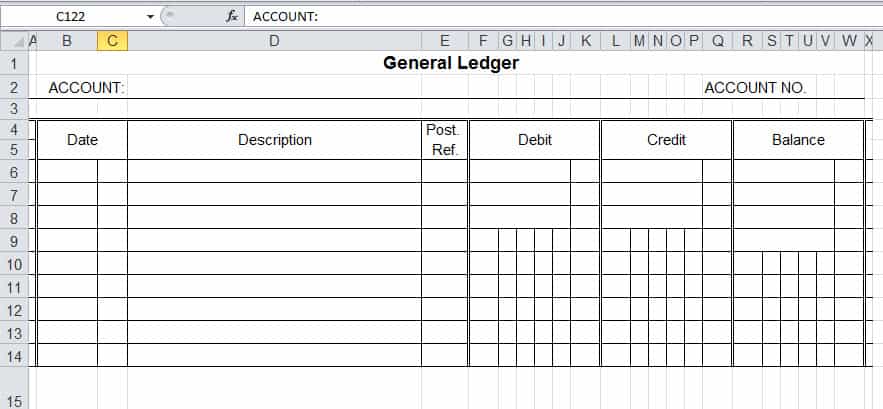

Excel Gneral Ledger Statement
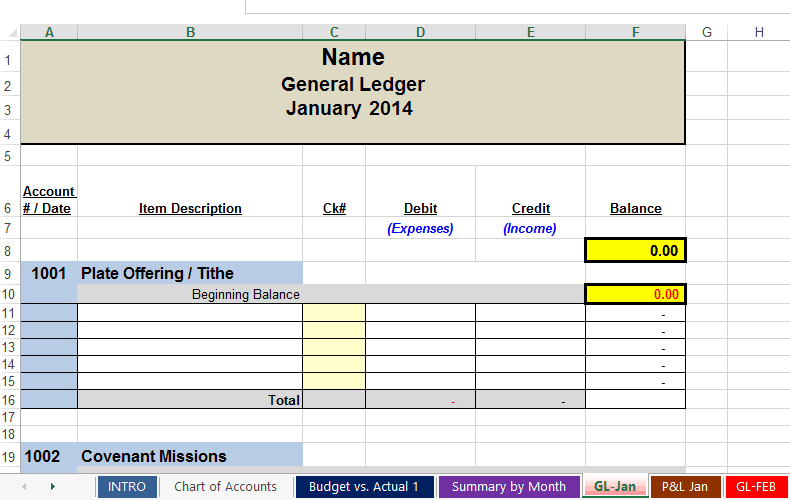
Frequently Asked Questions
Are these ledger statement templates free to download?
Yes, both ledger statement templates on this page are free to download and use.
What file format are these templates available in?
These templates are available in Excel format, making them easy to edit and customize with formulas.
Can I customize the fields on these templates?
Yes, since the templates are fully editable, you can add your own accounts, categories, and formulas.
What’s the difference between a ledger and a journal entry?
A journal entry is the first, chronological record of a transaction, while a ledger organizes those entries by account.
Can small businesses use these templates instead of accounting software?
Yes, these templates work well for small businesses and individuals who need a simple way to track transactions without dedicated software.
How often should I update my ledger?
It’s best to update the ledger regularly, such as weekly or as transactions occur, rather than batching entries infrequently.

You must be logged in to post a comment.