
Whether you’re managing a small business’s finances or simply need a professional way to document a bank deposit, a deposit slip template makes the process quick and error-free. This free, editable deposit slip template gives you a ready-made layout you can print and fill out by hand, or edit digitally before printing, so you always have an accurate record of funds going into an account. Below you’ll find three downloadable deposit slip templates in PDF and Excel formats, ready to use for personal or business banking needs.
Record deposit details without confusing a slip with proof of clearance
A deposit slip records the account, date and composition of money presented for deposit. It is not in itself evidence that a cheque cleared or that the bank accepted a particular amount.
- Always available: No need to search for a physical slip at the bank; print one whenever you need it.
- Consistent record-keeping: A standardized template ensures every deposit is documented the same way.
- Reduces errors: A clear, organized layout makes it easier to fill in the correct information accurately.
- Saves time: Pre-filling recurring details, like an account number, speeds up the deposit process.
- Useful for businesses: Companies handling multiple daily deposits benefit from a repeatable, professional format.
- Free and reusable: Download once and use the template as many times as needed.
Worked example: For a cash deposit of six $20 notes and five $10 notes, the declared amount is $170. List any cheques separately by amount and identifier, then compare the total with the bank’s stamped confirmation.
Check before use: Follow the bank’s current requirements because forms and data fields differ. Protect full account numbers, and never rely on a printable sample as a bank-issued confirmation of receipt.
For related resources, see 3 Bank Deposit Slip Templates and 5 Printable Payment Record Templates.
What’s Included in the Deposit Slip Template
- Date field: Space to record the date the deposit is made.
- Account information: Fields for the account number and account holder’s name.
- Depositor details: Space to note who is making the deposit, if different from the account holder.
- Deposit amount breakdown: Fields to separate cash and check amounts being deposited.
- Signature line: A space for the depositor to sign, confirming the transaction details.
- Bank branding area: Room to add your bank’s name or logo if customizing for business use.
Who Should Use These Templates?
- Small business owners who need a consistent way to document daily or weekly deposits.
- Bookkeepers and accountants tracking incoming funds for a business or organization.
- Nonprofit organizations depositing donations or event proceeds into an account.
- Individuals who want a backup deposit slip format on hand for personal banking.
- Retail businesses making regular cash deposits from daily sales.
- Property managers depositing rent payments collected from tenants.
How to Start Using the Template in 3 Simple Steps
- Step 1 — Choose a template style: Browse the three options below and select the format, PDF or Excel, that fits your needs.
- Step 2 — Fill in the deposit details: Add the date, account information, and deposit amount.
- Step 3 — Print and submit: Print the completed slip and bring it to the bank along with your deposit.
Deposit Slip vs. Withdrawal Slip
While both documents are common banking forms, they serve opposite purposes. A deposit slip records money being added to an account, capturing details like the amount deposited and its breakdown between cash and checks. A withdrawal slip, on the other hand, documents money being taken out of an account, typically requiring the account holder’s signature to authorize the transaction. Both forms share a similar structure, including account information and a signature line, but understanding which one you need before heading to the bank saves time at the counter.
Customizing the Template for Your Business
These templates are meant to be a flexible starting point rather than a fixed format. You might add your business name and logo for a more professional appearance, adjust the layout to include additional fields specific to your bookkeeping needs, or create multiple copies for different accounts your business manages. Since the templates are provided in editable PDF and Excel format, these kinds of adjustments take just a few minutes to make.
Choosing the Right Format
With three different templates available in PDF and Excel, choosing the right one depends on how you plan to use it. PDF templates are ideal for printing a clean, ready-to-fill-out slip by hand, which many people find faster for quick, one-off deposits. Excel templates work well if you want to type in the details digitally before printing, or if you’re keeping a digital record of deposits alongside the printed slip for your own bookkeeping purposes.
Common Mistakes to Avoid
- Miscounting cash or checks: Double-check the amounts before writing them on the slip to avoid deposit discrepancies.
- Missing account information: Always include the correct account number to prevent processing delays.
- Illegible handwriting: Write clearly, especially for numbers, to avoid bank processing errors.
- Forgetting to sign: Many deposit slips require a signature to be processed at the counter.
- Not keeping a copy: Keep a copy of the completed slip for your own records before submitting it.
Tips to Get the Most Out of Your Deposit Slip Template
- Pre-fill recurring details like your account number to save time on repeat deposits.
- Keep a stack printed if you make frequent deposits, so one is always on hand.
- Double-check totals before submitting to avoid discrepancies with the bank’s records.
- Store digital copies alongside your business’s financial records for easy reference.
- Use a consistent format across your business to make bookkeeping and reconciliation easier.
Understanding the Deposit Process
Most banks process a deposit slip by verifying that the total amount recorded on the slip matches the actual cash and checks being deposited before crediting the account. This is why accuracy on the slip matters: a mismatch between the recorded total and the actual funds can delay processing or create confusion about the final deposited amount. For check deposits specifically, some banks also require a brief description or the check number, which helps both the bank and the depositor track individual transactions within a larger deposit if a question arises later.
Deposit Slips for Business Bookkeeping
For businesses that handle cash and check transactions regularly, keeping copies of every deposit slip alongside sales records creates a paper trail that supports accurate bookkeeping and simplifies tax preparation. Reconciling deposit slips against daily sales totals helps catch discrepancies early, whether from counting errors, missing deposits, or accounting mistakes. Many small businesses find that using a consistent deposit slip template, rather than relying solely on whatever slips the bank provides at the counter, makes it easier to maintain organized financial records across months or years of operation.
Digital Deposits and the Role of Paper Slips Today
With mobile check deposit and online banking now widely available, some people wonder whether paper deposit slips are still necessary. For in-person cash deposits at a bank branch or ATM, a completed deposit slip is often still required, since cash cannot be deposited through most mobile banking apps. Businesses handling significant cash volume, such as retail stores or restaurants, still rely heavily on paper deposit slips as part of their daily closing routine. Even as digital banking grows more common, having a reliable printable deposit slip template remains a practical necessity for anyone who regularly deposits cash or handles in-person banking transactions.
Keeping Accurate Records Across Multiple Accounts
Businesses or individuals managing more than one bank account often find it helpful to color-code or label printed deposit slip templates by account, reducing the chance of accidentally depositing funds into the wrong place. This becomes especially important for organizations managing separate operating and savings accounts, or nonprofits tracking restricted versus general funds. Keeping a simple running log alongside your printed deposit slips, noting the date, amount, and account for each deposit, adds an extra layer of accuracy and makes it far easier to spot any discrepancy between your own records and the bank’s statement at the end of the month.
What to Do If You Make a Mistake on a Deposit Slip
Errors happen, especially when filling out a deposit slip quickly during a busy day. If you notice a mistake before submitting the slip at the bank, the safest approach is simply to void the incorrect slip and fill out a fresh one, rather than trying to cross out and correct an error, since heavily corrected slips can sometimes cause processing delays or be rejected outright by bank staff. Having a printable template readily available makes this easy: you can quickly print another copy rather than searching for a replacement blank slip. If an error is only discovered after the deposit has already been processed, contacting your bank directly as soon as possible is the best way to resolve any discrepancy between what was recorded and what was actually deposited.
Printing Tips for Deposit Slip Templates
When printing a deposit slip template at home or in the office, using standard letter-size paper and a laser or inkjet printer with clear, dark ink ensures the slip is legible and processes smoothly at the bank counter. Some businesses prefer printing several blank copies in advance and keeping them in a folder or drawer near the register, so a slip is always ready whenever a deposit needs to be made without waiting to print one on demand. If your bank has specific formatting requirements or a preferred layout, it’s worth checking with them directly before relying heavily on a printed template, since a small number of institutions may only accept their own pre-printed slips for certain account types.
Have A Glance At Deposit Slip Templates Here
Bank Deposit Slip PDF
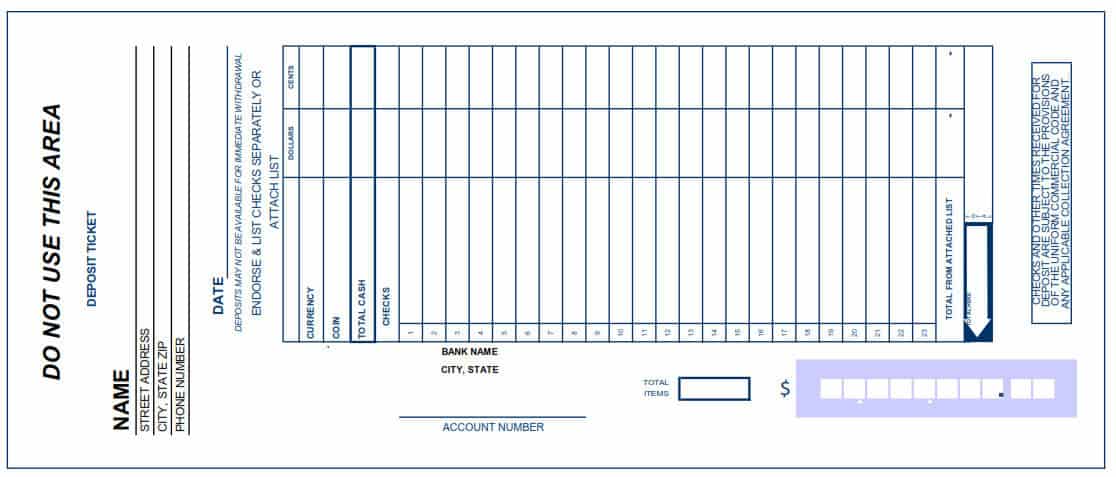

Printable Bank Deposit Slip
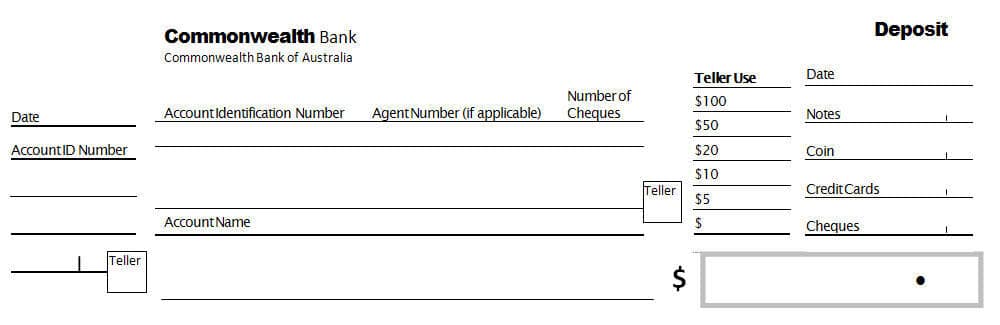
Bank Deposit Slip Format PDF
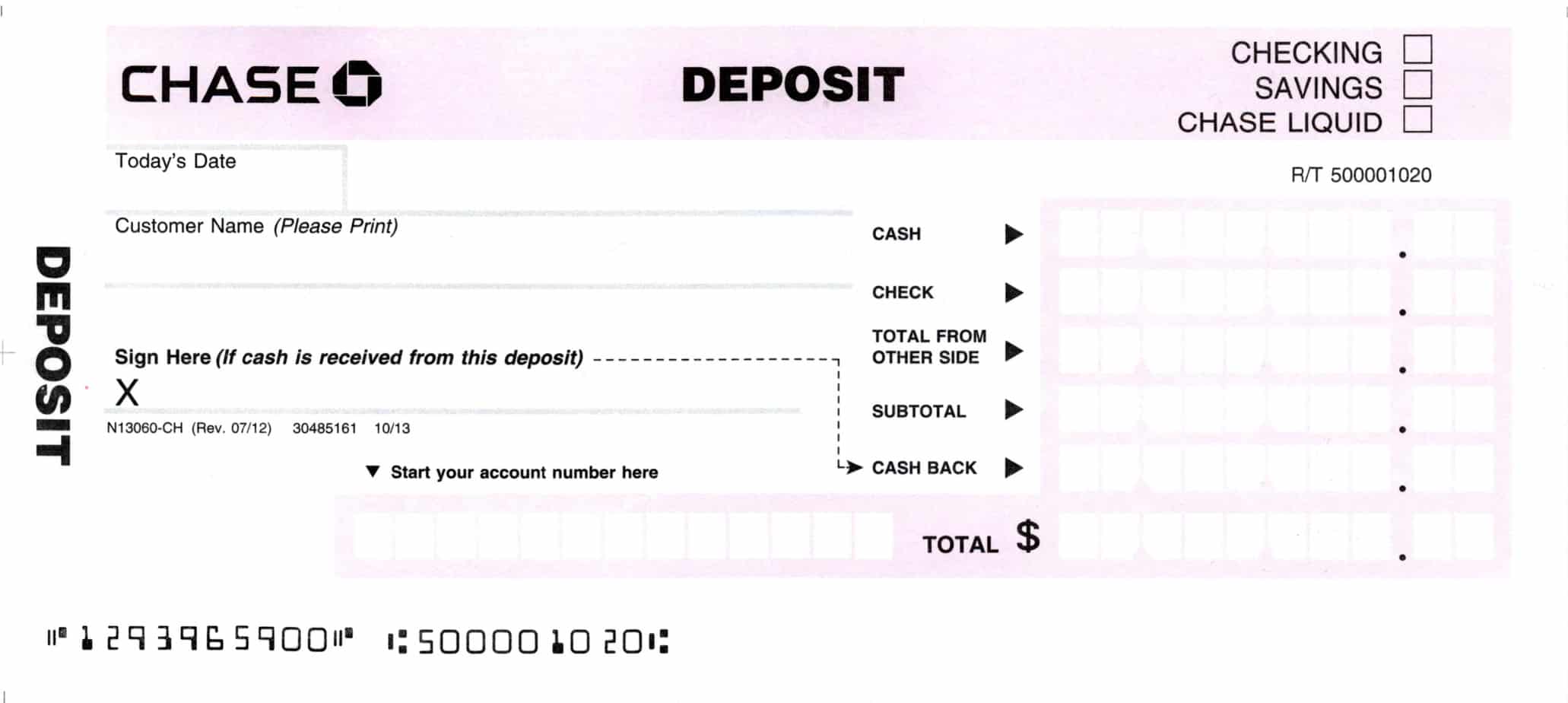
a>
Frequently Asked Questions
Are these deposit slip templates free to download?
Yes, all three deposit slip templates on this page are free to download and use.
Which file formats are these templates available in?
The templates are available in PDF and Excel formats.
Can I use these templates for business deposits?
Yes, these templates work well for both personal and business deposits, including cash and check transactions.
Can I customize the template with my business name?
Yes, the Excel version is editable, letting you add your business name or logo before printing.
Do banks accept printed deposit slip templates?
Most banks accept properly filled-out deposit slips printed from a template, though it’s worth confirming with your specific bank.
What information do I need to fill in on a deposit slip?
You’ll typically need the date, account number, depositor’s name, and a breakdown of the cash and check amounts being deposited.
Can I deposit cash using these slips?
Yes, these templates include fields for recording cash deposit amounts along with check deposits.

You must be logged in to post a comment.