
Weekly update templates provide a consistent structure for communicating what changed during a reporting period. A useful update tells readers what was completed, what remains uncertain, what needs a decision, and what happens next. The examples below include different report and newsletter-style layouts.
The goal is to help readers understand progress without reconstructing it from a long activity list. This guide explains how to select relevant information, distinguish results from effort, report blockers clearly, and prepare an update that supports timely action.
Identify the audience and the decision it supports
Decide who will read the update and why. A manager may need delivery status and decisions, a project team may need dependencies and handoffs, and a broader group may need a short explanation of notable changes. These audiences do not necessarily need the same level of detail.
Write a sentence describing what the reader should know or do after reading. Use that purpose to choose the content. An update becomes less useful when it includes everything the writer knows without considering whether the recipient can use it.
Define the reporting period and context
State the week or date range, project or team name, author, and the date the update was prepared. Include a reference to the relevant plan when readers need context. A clear period prevents old work from being presented as a new result.
Keep the reporting convention consistent. If the update is issued before the week ends, make that limitation clear. Identify any information that is provisional or awaiting confirmation. Readers should be able to distinguish a checked result from an expectation for the remainder of the period.
Lead with the most useful information
Open with a short summary of the current position and any important change. If a decision or blocker requires attention, place it where the responsible person will see it. Avoid making the reader search through several paragraphs of routine activity to find the main issue.
Use a concise overall status only when its meaning is defined. A green label can conceal different interpretations of progress, scope, and risk. Explain the basis of the summary in plain language so the reader understands what has changed and why it matters.
Report outcomes rather than only activity
Describe the result of the work. “Held three meetings” explains effort but not what the meetings achieved. “Agreed the draft scope and assigned the remaining review questions” tells the reader what changed.
Connect each important result to a deliverable, milestone, or objective. A statement of work can provide a reference for agreed outputs. Keep supporting activity notes where they are useful, but do not let them replace a clear account of the result. This makes the update easier to assess across reporting periods.
Compare progress with the relevant plan
Show the relationship between current progress and the agreed milestones or commitments. Explain a change in timing, scope, or expected output when it affects the reader. Avoid presenting a list of completed tasks without indicating whether the project is where it needs to be.
A project timeline can support the milestone reference. If a date is revised, identify the previous commitment, the new expectation, and the reason at a level appropriate to the audience. Keep assumptions visible when the new date still depends on unresolved information.
Make blockers specific and actionable
A blocker should state what cannot proceed, what is missing, and who can help resolve it. “Waiting for feedback” is less useful than identifying the document, required reviewer, decision needed, and effect of the delay.
Add an owner and a requested response date when action is needed. Distinguish a current issue from a possible future risk. A weekly progress report becomes more useful when a reader can act on the information without sending several messages to discover what the writer actually needs.
Record decisions and open questions
List important decisions made during the week and their implications. This creates a concise reference for people who were not present in the discussion. Include who made or confirmed the decision when that is relevant to the work.
Keep open questions separate from settled decisions. State what must be decided, the options or context needed, and the responsible person. Do not make an unresolved assumption look like an agreed direction. If detailed discussion belongs elsewhere, provide a clear reference rather than copying the entire conversation into the update.
Use metrics with definitions and context
Choose figures that help the audience understand the work. Define the measure, reporting period, and source when they are not obvious. A number can look impressive while answering a different question from the one the reader needs to assess.
For sales-related work, a product sales report may provide a useful supporting record. Avoid mixing cumulative totals with weekly figures or changing definitions between updates. Explain important changes and uncertainties. A small number of consistently defined measures is usually more useful than a large dashboard of unexplained values.
Work through a project-update example
Imagine a team developing an internal guide. The weekly update reports that the first draft is complete, two sections have been reviewed, and one section is waiting for source information. The next milestone is a consolidated review.
The update identifies the person responsible for the missing information and the date needed to keep the review on track. It also records a decision to remove an out-of-scope appendix. The reader can understand the current position, see the immediate action, and distinguish completed work from a remaining dependency.
Set out next week’s priorities
List the small number of outcomes the team intends to achieve next. Identify dependencies and owners where necessary. Avoid turning the section into a complete task register; it should help readers understand the direction of work and the commitments that matter.
Check that the next steps follow from the current position. If this week’s update reports an unresolved approval, next week’s plan should not quietly assume it will happen. Mark the dependency and explain what work can proceed independently so the plan remains credible.
Adjust the tone for reports and newsletters
A project report usually needs direct language about status, decisions, and delivery. A team newsletter may also include useful announcements or recognition. Keep the main purpose clear even when the tone is more conversational.
The professional email templates can help shape a short message accompanying the update. Use a subject or heading that identifies the team and period. Keep essential action requests in the message where recipients will notice them, with the detailed report available as a supporting reference.
Keep the format easy to scan
Use consistent headings, short paragraphs, and clear labels for completed work, issues, decisions, and next steps. Avoid large blocks of text that mix several topics. Tables can help when several items need the same fields, such as owner, action, and date.
Choose emphasis carefully. If every sentence is bold or colored, the reader has no signal for what matters most. A weekly status update should be understandable on the device where it will be read, including a compact email or a small screen.
Review the update for accuracy
Check names, dates, figures, status labels, and references before sharing. Make sure the wording does not imply completion when work is only started or submitted for review. Confirm that requested actions have a clear recipient and a practical response date.
Compare the update with the source plan or task record rather than relying only on memory. Remove stale issues that have been resolved, but retain the decision or result where it helps continuity. A short accurate report builds more trust than a longer report containing unchecked claims.
Choose a template and establish a routine
Compare the previews for the balance between narrative, status fields, and announcements. Check the actual resource format after opening the link. An older layout may need adaptation to suit the audience and the way the update will be distributed.
Save a clean original and test it with one reporting period. Keep one owner responsible for assembling the final copy, agree when contributors provide information, and identify the current version. Review the format occasionally with readers. Keep sections they use and remove fields that create work without helping a decision.
Download Free Weekly Update Templates
Sample Weekly Update Template
ZIP and RAR links are archives: check the files inside after extraction. PDF and image links are examples rather than editable Word or Excel files. External resources follow their source’s availability and usage terms. Read download help.
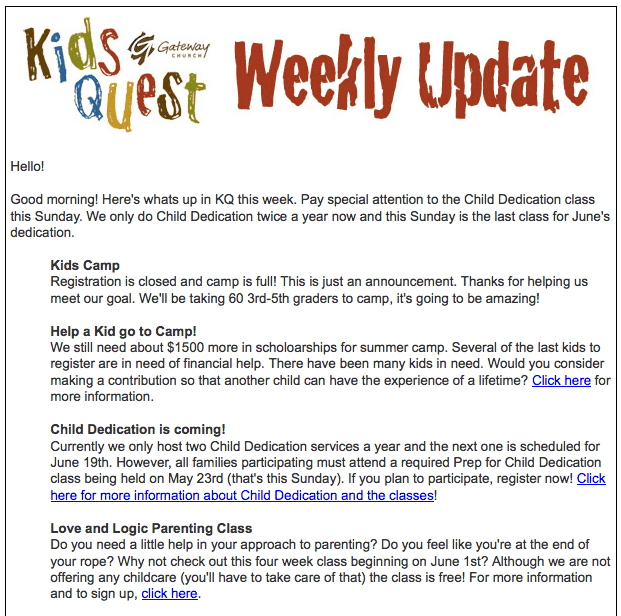 View Sample Weekly Update Template (image preview)
Weekly Update Newsletter Example
 Visit Weekly Update Newsletter Example source page
Business Weekly Update Sample
 Preview only: no downloadable file is linked to this example.
Frequently Asked Questions
What should a weekly update contain?
Include the reporting period, current position, important results, blockers, decisions, and next steps. Add metrics and references when they help the reader assess or act on the information.
How long should a weekly update be?
Use enough detail to support its purpose. A short summary may be sufficient for one audience, while a project owner may need a structured report with supporting references.
How do I report a blocker clearly?
State what cannot proceed, what is needed, who can resolve it, and when a response is required. Explain the effect without making the reader infer the connection.
Should I include every task completed?
Usually a selected account of meaningful results is more useful. Keep the full task record elsewhere and report the work that changes the project’s position or needs attention.
What is the difference between an issue and a risk?
An issue exists now and needs handling. A risk is an uncertain future event or condition. Keep the distinction clear so readers understand what action is immediate.
Can a weekly update be used as a newsletter?
Yes. Adapt the tone and sections to the audience, while keeping important changes and action requests visible. Do not let optional announcements conceal the main purpose.

You must be logged in to post a comment.