
Use check register templates to track account transactions and reconcile a running balance with the bank’s actual records.
Editable downloads and previews
Use the file links where provided. Links labeled “View original source” open another website; check its current format, availability and terms. A preview image alone is not an editable document.
Template previews and source links
Check Register Sample

Excel Check Register Template
 Download Excel Check Register Template (XLS)
Checkbook Register Template Excel
 View the original source page
Multiple Accounts Check Register
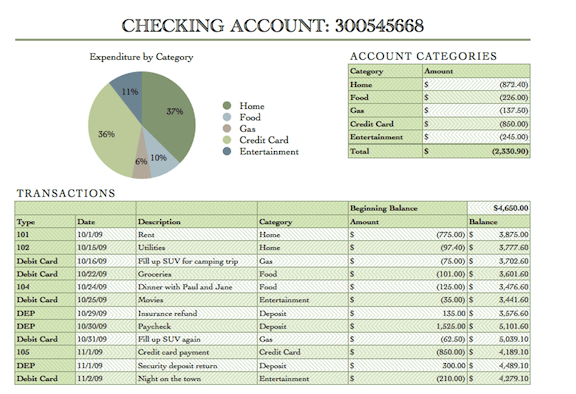 The older external file is unavailable. Its preview is retained for reference.
A check register tracks more than paper checks when the account also has electronic payments, deposits, and fees. Distinguish recorded transactions from cleared transactions. The register’s balance may differ from the bank’s displayed balance because timing and pending items need reconciliation.
Choose a suitable template
Choose a financial layout by the question it answers. A dated position, a period’s performance, and a transaction history are different views. Check that the proposed headings match the purpose before entering figures. If another party requires a prescribed format, use that format and treat these resources as supporting examples. A shorter worksheet with traceable figures is preferable to an elaborate report whose totals cannot be explained.
Important details to prepare
Opening balance
Use a supported starting balance and date. An unexplained opening difference will carry through every later running total. Keep the relevant supporting balance or source beside the working record until it has been checked. A convenient round figure is not evidence, and a later update should retain enough context to explain what changed.
Transaction date
Record the relevant transaction date and, where useful, the clearing date separately. Do not overwrite the original date when an item clears. Write down the classification rule in ordinary language. When a similar entry occurs next month, the person recording it should reach the same decision without having to reverse-engineer the previous workbook.
Reference and payee
Include the check number or transaction reference and an understandable payee description. Keep sensitive account details out of shared copies. Use a consistent reference to connect the entry with its evidence. This makes a question easier to resolve and avoids relying on someone’s memory when the report is reviewed after the period ends.
Money out and in
Use separate debit and credit columns or a clearly documented sign convention. Enter transfers, fees, and refunds consistently. Keep estimates distinguishable from recorded facts. A useful estimate identifies its date, basis, and limitations rather than appearing in the same form as a confirmed transaction.
Running balance
Calculate the previous balance plus money in minus money out. Protect the formula and check that inserted rows extend it correctly. Review the effect on relevant subtotals as well as the final number. An offsetting mistake can leave a grand total unchanged while making the categories misleading.
Reconciliation
Mark cleared items and investigate missing, duplicate, or unexpected transactions. Retain unresolved items until their status is confirmed. Record the reviewer and the date of the check where the process needs an audit trail. Resolve exceptions through a documented correction rather than silently replacing a previously issued result.
How to complete the template
Build the record from supporting documents rather than from the desired final total. Establish the opening position, enter the relevant period’s activity, and reconcile the resulting figures. Keep actuals, estimates, and forecasts visibly distinct. Use a single currency for totals unless an explicit conversion method is documented. Where the accounting basis matters, state it and apply it consistently to every relevant category.
Worked example
A register opens at 1,000. A 200 payment reduces it to 800, and a 500 deposit increases it to 1,300. A 10 bank fee then leaves 1,290. If the payment has not cleared, the bank’s displayed balance may differ. Reconciliation explains the difference rather than forcing the register to match by deleting the payment.
Check accuracy before use
Follow at least one amount from its source document into the worksheet and through to the final report. Then work backward from a subtotal to its component entries. Look for duplicated records, omitted dates, inconsistent signs, and values pasted over formulas. A total that adds correctly can still be wrong if the underlying scope or classification is inconsistent. Document unresolved items instead of making an unexplained balancing adjustment.
Related resources for the next step
Use Excel checkbook register templates to compare running-balance layouts.
Use bank deposit slip templates to support deposit records.
Use ledger statement templates to organize related account detail.
