
Use Excel mileage log templates to record vehicle trips with dates, distances, purposes, and a traceable reimbursement calculation.
A mileage log is a record of actual travel, not a way to turn every journey into a business expense. Keep business, commuting, and private use distinguishable under the applicable rules. Reimbursement policies and tax treatment may differ, so record the facts before applying a rate.
Choose a suitable template
Choose a log by the facts you need to preserve and the decisions those facts support. A journey record, mileage record, and reflective journal may overlap but need different detail. Keep actual events separate from plans or estimates. The best layout is one that can be maintained promptly and reviewed without guessing what the entries mean.
Important details to prepare
Vehicle and period
Identify the vehicle and reporting dates. If several vehicles are used, keep their readings and trip records separate. Use a reference that connects the entry with the correct activity and period. Consistency makes later review easier when several similar events occur.
Trip date and route
Record the travel date, origin, destination, and enough route detail to explain the journey without exposing unnecessary private addresses. Record the date, route, or sequence accurately and state any important time or unit convention. Small ambiguities can affect totals and interpretation.
Business purpose
State the specific work purpose or client reference. A generic business label provides less useful support than a clear appointment or task. Describe the actual purpose in factual language. Do not change a private or personal activity into a business one merely to fit the chosen template.
Distance
Record starting and ending odometer readings or the supported distance method. Use one distance unit consistently and check arithmetic. Keep measurements supported and distinguish estimates from observations. A calculated value should retain the inputs needed to explain it.
Rate and amount
Record the approved rate, its effective date, and currency separately from distance. Do not assume an old template’s rate is current. Connect amounts with evidence and the relevant currency or policy. A log entry alone may not establish eligibility for reimbursement or another formal outcome.
Evidence and review
Link relevant appointments or receipts where appropriate and review missing entries promptly. Retain the original trip facts when correcting a calculation. Review changes and keep useful context. A correction should make the record more accurate without erasing how the earlier entry was resolved.
How to complete the template
Establish a consistent period, reference, unit system, and source for entries. Record the relevant date, activity, purpose, and supporting detail close to the event. Use explicit currencies or distance units where needed. Keep private identity, client, or payment information outside a broadly shared working log. Mark estimates honestly and replace them with confirmed facts only through a traceable update.
Worked example
A staff member records a client visit with odometer readings of 18,240 and 18,286, giving 46 distance units. At an illustrative employer-approved rate of 0.40 per unit, the calculated claim is 18.40 in the agreed currency. This is an arithmetic example, not a tax rate. The reviewer confirms the purpose and applicable policy before approval.
Check accuracy before use
Review the sequence for missing entries, duplicated journeys, inconsistent units, and unexplained totals. Compare relevant amounts or readings with supporting evidence. A record can be complete in appearance while still confusing planned activity with actual activity. Check whether another reader could follow the entry without access to the original conversation.
Check the final layout
Leave enough space for long names and descriptions, use readable text for essential instructions, and label statuses in words as well as color. Check the printed or exported copy at its intended size. On continuation pages, repeat the document reference and page number.
Keep the record up to date
Set a regular review appropriate to how quickly details are forgotten. Keep corrections traceable and link related evidence through references rather than copying everything into the log. Store the reviewed version securely and use a suitable shareable summary when necessary. Use the accumulated record to identify practical lessons or support the relevant claim, not to invent facts missing from the original record.
Related resources for the next step
Use service log templates to connect travel with completed service visits.
Use expense report templates to submit approved mileage with other trip expenses.
Use sales call log templates to record the client activity supporting a sales journey.
Browse the template previews
Compare the previews for layout, writing space, and useful fields. Where a resource link is provided, check its file format and usage terms before editing. Some previews are images or examples rather than editable downloads.
Authoritative guidance
For U.S. tax questions, IRS Publication 463 explains travel and vehicle substantiation. Confirm the applicable tax year and distinguish tax rules from an employer’s reimbursement policy. See IRS travel and vehicle recordkeeping guidance.
Download excel mileage log templates here
Excel Mileage Log Sheet
ZIP and RAR links are archives: check the files inside after extraction. PDF and image links are examples rather than editable Word or Excel files. External resources follow their source’s availability and usage terms. Read download help.
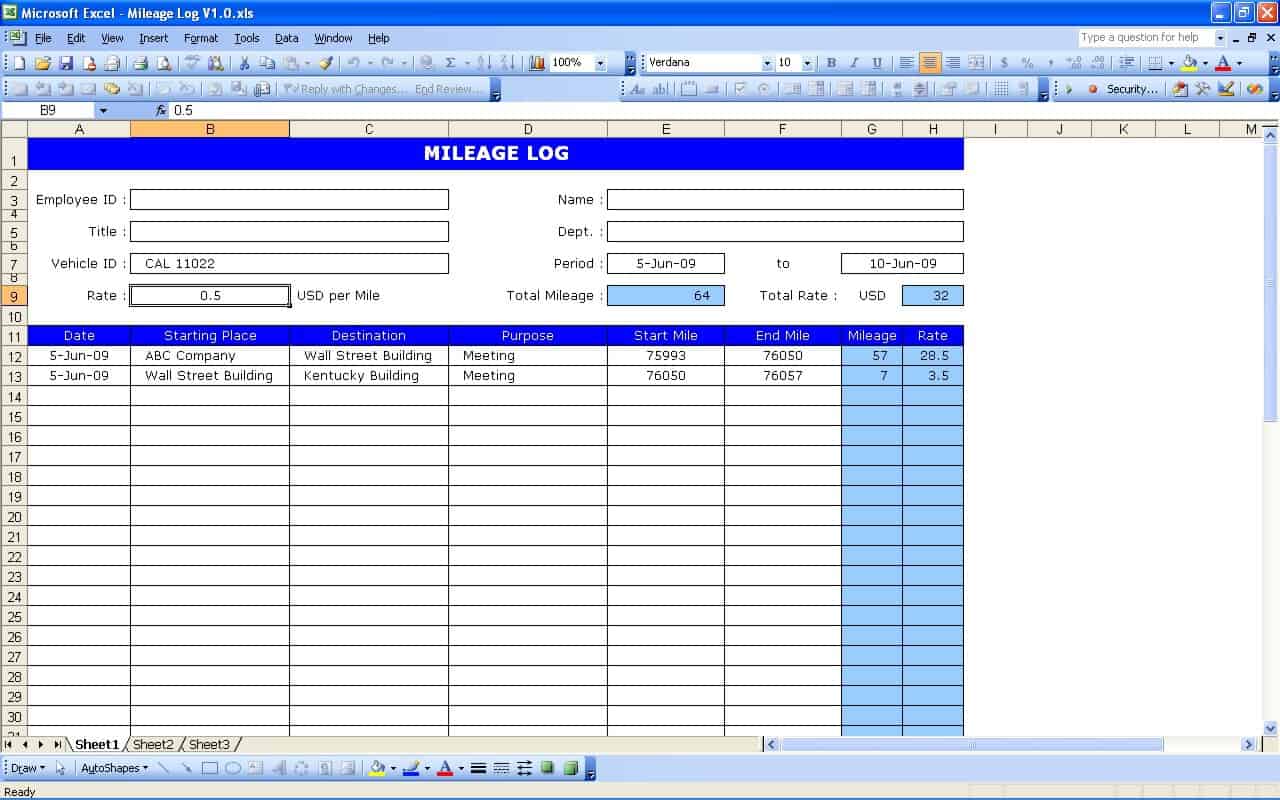 Open Excel Mileage Log Sheet source (PDF example)
Simple Mileage Log
 Open Simple Mileage Log source (Excel XLSX)
Mileage Log Blank Template
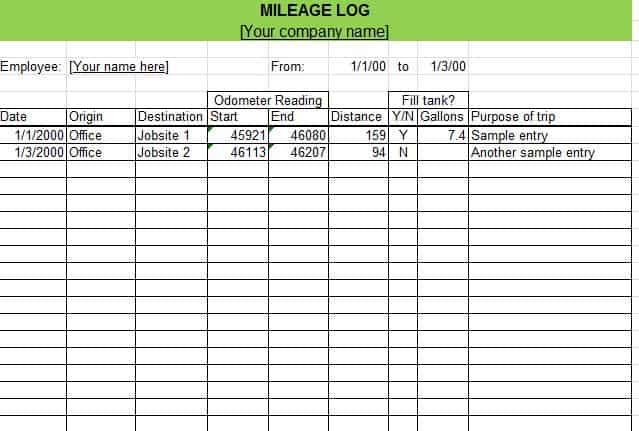 Open Mileage Log Blank Template source (PDF example)
Vehicle Mileage Log For Tax Purpose
 Open Vehicle Mileage Log For Tax Purpose source (PDF example)

You must be logged in to post a comment.