
Use TV programs schedule templates to organize program viewing or internal planning with clear dates, channels, time zones, and update sources.
Editable downloads and previews
Use the file links where provided. Links labeled “View original source” open another website; check its current format, availability and terms. A preview image alone is not an editable document.
Template previews and source links
TV Programs Schedule Example
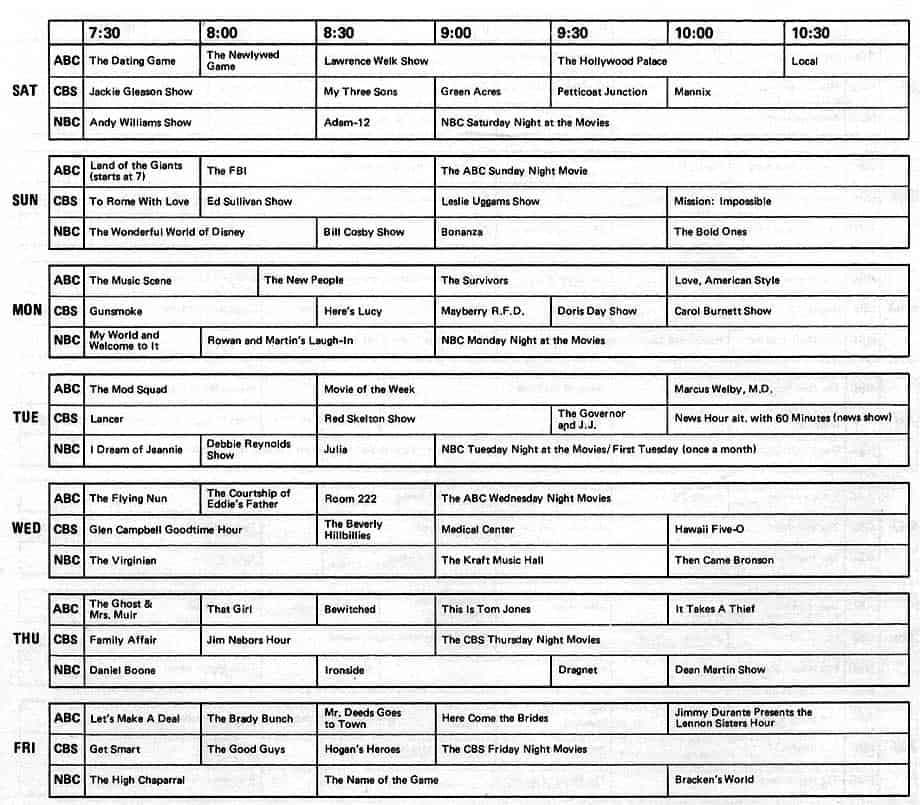 View original source for TV Programs Schedule Example
Weekly TV Programs Schedule
 Download Weekly TV Programs Schedule (PDF)
TV Programs Schedule Sample
 Download TV Programs Schedule Sample (PDF)
Daily TV Programs Schedule Template

A television program schedule is time-sensitive. Distinguish a personal viewing plan from an official broadcaster listing or transmission log. Confirm current listings with the relevant provider and do not present an old template’s sample times as today’s broadcast schedule.
Choose a suitable template
Choose a schedule layout that clearly distinguishes dates, start times, durations, and status. Decide whether it is a personal plan, a shared coordination tool, or an official operational record. A sample timetable is not a source of current listings. Use the relevant provider or responsible organization to confirm time-sensitive entries.
Important details to prepare
Date range
Use explicit dates rather than weekday names alone. A repeating weekly layout still needs a clearly stated week. State the reporting range explicitly. Weekday labels alone can be misleading when a copy is reused or read after the intended week.
Channel or service
Identify the actual channel, platform, or service. Availability may vary by location or subscription. Identify the correct service or responsible source. Similar names and regional variations can make an otherwise accurate entry unusable.
Program
Use the correct title and relevant episode or event information. Keep sample entries clearly marked until replaced. Use clear titles and mark examples as examples until replaced. A sample should not look like a confirmed current listing.
Time and duration
State the time zone and distinguish start time from duration. Account for programs that cross midnight. Keep date and time conventions consistent, including any time-zone or midnight transition. Readers should not have to infer which day an entry belongs to.
Status and source
Record whether the entry is confirmed, provisional, live, or a repeat where relevant. Keep the listing source and check date. Record the source and status so the reader can judge reliability. A provisional entry should not gain authority merely because it appears in a formatted table.
Changes
Update cancellations or schedule shifts without hiding the revision. Separate a personal reminder from an assurance that a program will air as listed. Make updates visible and keep the working version current. A changed entry should explain the new arrangement rather than leave several conflicting copies in circulation.
How to complete the template
Set the date range and time zone before adding items. Identify the source of each confirmed entry and keep provisional information visibly provisional. Use consistent labels and avoid merging a duration with an end time. Where an event crosses midnight, state the next date clearly. Leave room for updates rather than forcing every change into an unreadable note.
Worked example
A household creates a weekend viewing plan using the provider’s current listings. A live event is marked as subject to schedule changes, and all times use the household’s local zone. A late-night film ends on the following date. When the provider moves a program, the plan records the change instead of relying on an old printout.
Check accuracy before use
Read the schedule chronologically and look for overlaps, missing dates, inconsistent time zones, and unexplained gaps. Confirm that a reader can identify the correct channel, service, location, or responsible party. Check the date of the source information and verify important arrangements close to use. A neat layout does not make an outdated listing reliable.
Related resources for the next step
Use work schedule templates to coordinate viewing with other commitments.
Use dashboard templates to compare a compact schedule display.
Use contact information templates to maintain relevant provider support details separately.
